
B16 2023
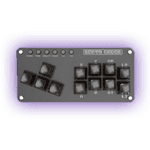
As the The Brave Fighter of Sun Fighbird meme goes ‘Is this a leverless?’. Well, it’s basically a keyboard, which technically does make it a leverless controller.
At A Glance
Pros & Cons:
Pros:
- The most portable offering from Haute42
- Great number of buttons and layout for WASD gamers.
- Super cheap
- It’s a keyboard, if that’s what you want.
- MX Switches means tons of alternate options
Cons:
- Only one USB-C port
- No screen to indicate input modes
- Replacing keycaps and placing art technically possible but can get super expensive.
| Item | Description |
|---|---|
Dimensions |
19.8cm X 9.8cm |
Keycaps |
16 ( “A” cap x 14, “Tab” cap x 2 ) |
USB-Ports |
1 x USB-C, 1x USB-A (Passthrough) |
Artwork Friendly |
No (Only with Aftermarket Plexi) |
Material |
Plastic |
Switches |
Leobog Graywood V4 (MX) |
Price |
₹3800 (Approx.) |
Variations:
Pros: It's a Haute42 Keyboard
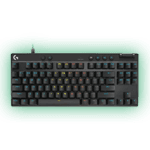
The B16 is essentially a keyboard with most of the keys removed, leaving just enough inputs to play fighting games. That said, leverless controllers are glorified keyboards to begin with, so the B16 technically fits the definition.
Designed with WASD players in mind, the B16 uses a familiar layout that feels immediately comfortable if you come from keyboard gaming and are hesitant to fully commit to a traditional leverless setup. If the idea of a jump button at the bottom feels intimidating, this controller will feel right at home.
Haute42 did not skimp on leverless-specific features either. You get not one, but two jump buttons at the bottom, both using longer, Tab-sized keycaps. This creates a split jump layout that very few controllers offer. Since the B16 runs GP2040-CE, it also includes a USB-A passthrough port, allowing it to work on Xbox, Switch, and PlayStation consoles with some setup. That is something a regular keyboard usually cannot do.
It also includes RGB lighting like other Haute42 controllers, despite being their cheapest offering. On top of that, it uses MX switches, a feature it shares only with the G-Series and the high-end X-Series. This opens the door to a massive aftermarket of switch options.
Cons: It's ultimately just a Keyboard
Because the B16 is a compact, low-cost keyboard that fits in the palm of your hand, there is no space for an LED screen. This means you cannot easily tell which input mode you are in just by looking at it.
In theory, this is not a problem if you follow the instructions carefully when switching platforms. In practice, it can be frustrating. For example, you might connect it to a PS5 using a compatible dongle, press the correct button combination, mistime it slightly, and remain in XInput mode. Eight minutes later, you disconnect mid-match when the timeout hits.
Another limitation is the single USB-C port. If it fails, you are out of options. That said, every keyboard I have ever used also relies on a single cable, so I am not going to knock points off for this, especially given how inexpensive the B16 is.
Customization is also more complicated than it looks. While you can personalize the B16 with custom keycaps and artwork, it gets expensive fast. There is no removable plexi for artwork, so you need to buy or make one yourself. On top of that, replacing the stock keycaps only really makes sense if you want printed symbols or artwork, and those options tend to be pricey.
Good Entry Point that's Outclassed by the S16
I cannot fault the B16 for what it is or the audience it targets. It fills a specific niche and does so well. However, from a pure value perspective, it is hard not to ask why you would not just buy an S16, or a G16 if you want MX switches.
With those options, you get larger button caps, a familiar WASD layout, dual USB-C ports, support for front and back artwork, cheaper aftermarket caps, and a more traditional leverless feel. All of that comes at only about a 10 to 20 percent price increase.
On paper, the B16 is cheaper. In practice, the S16 delivers far more value for the money, and that is why I am docking a point here.